

A help desk account enrolls in a template called SmartCard-EnrollStation. The template was set up in 2019 for the smart card pilot, so that the desktop team could provision cards for new hires without the new hire being present. The pilot ended. The template stayed published, and the enrollment group still resolves to a half-dozen accounts nobody has reviewed since.
What that account now holds is a certificate with the Certificate Request Agent EKU. In plain terms, it is permission to ask the CA for certificates on behalf of other people. The CA was told, years ago, to trust this template's holders to do exactly that.
The account uses it to request a certificate from the default User template, on behalf of a Domain Admin. The CA has no reason to object. The requesting account is an authorized enrollment agent, the CA's enrollment agent restrictions were never configured, and the User template hands out client authentication certificates to anyone who can enroll. The certificate comes back issued to the Domain Admin, with the Domain Admin's name, the Domain Admin's SID extension, and a private key the help desk account controls.
That is a domain admin logon credential, minted on request, by a low-privileged account, through a feature that is working exactly as designed.
This is ESC3. It was published in 2021 in Will Schroeder and Lee Christensen's Certified Pre-Owned research at SpecterOps. It is usually filed next to ESC1 and ESC2 because the templates share most of their conditions, but the mechanism is different in a way that matters for how you defend against it. ESC1 is about a certificate that claims to be someone else. ESC2 is about a certificate that can do anything. ESC3 is about a certificate that lets you request certificates as anyone else, through the front door, with the CA's blessing.
This article is for the defender. It covers what ESC3 actually is, why the legitimate feature behind it ends up exposed, the part where the remediation for ESC1 and ESC2 quietly becomes the thing that enables ESC3, and how to find and fix it in your environment.
I'm assuming you've read the ESC1 and ESC2 articles. The detection tooling, the nested-group expansion, the publish-only-what-you-use discipline, the scaling story are all there and I'm not going to rewrite them. Where ESC3 reuses that machinery, I point back rather than duplicating.
I won't walk through exploitation. SpecterOps covers it, Certify and Certipy document the tooling. Use those when you need to show leadership the attack. Use this when you need to find it and fix it.
What ESC3 actually is
The first thing to get straight: ESC3 is not one misconfigured template. It is a chain of two enrollments plus a CA setting that was never touched. The four-condition framing that worked for ESC1 and ESC2 does not map cleanly here, so don't force it.
The chain has two halves.
Half one: get an enrollment agent certificate. Somewhere in the environment is a template that issues certificates carrying the Certificate Request Agent EKU (OID 1.3.6.1.4.1.311.20.2.1, also labelled "Enrollment Agent"). If a low-privileged account can enroll in that template, it walks away with an agent certificate. This half looks exactly like an ESC1 or ESC2 finding: enrollable by the wrong people, no manager approval, no signature required to get it. The only difference is the EKU.
Half two: use it to enroll on behalf of someone privileged. With an agent certificate, the account can co-sign a certificate request for another user. Whether the CA accepts that request depends on the CA's enrollment agent restrictions and on the target template. By default the CA does not restrict enrollment agents at all, which means any agent certificate can request on behalf of anyone, for any template that account could otherwise enroll in.
In the BrkrOps lab we have a template called ESC3 configured to satisfy half one, and we use the default User template and a V2 lab template called PIXA User to illustrate the two ways half two plays out. The screenshots below reference them.
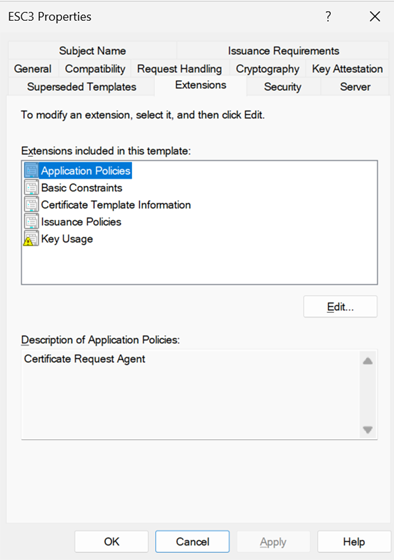
Half one; the enrollment agent template.
A template mints enrollment agent certificates when all of the following hold:
- The template's EKU list includes Certificate Request Agent (
1.3.6.1.4.1.311.20.2.1). Any Purpose (2.5.29.37.0) counts too, because Any Purpose is a superset and includes the agent capability. So does an empty EKU list on a schema version 1 template. If you remediated ESC2 Variant A or B and left those templates enrollable, you may have moved the finding rather than closed it. - A low-privileged user has Enroll permission, directly or through nested group membership.
- Manager approval is not required (
CT_FLAG_PEND_ALL_REQUESTSis absent frommsPKI-Enrollment-Flag). - No authorized signature is required to obtain the agent certificate itself (
msPKI-RA-Signatureis zero on this template).
The first condition is the only one specific to ESC3. The other three are the same enrollable-by-anyone, no-gate conditions you have already met twice.
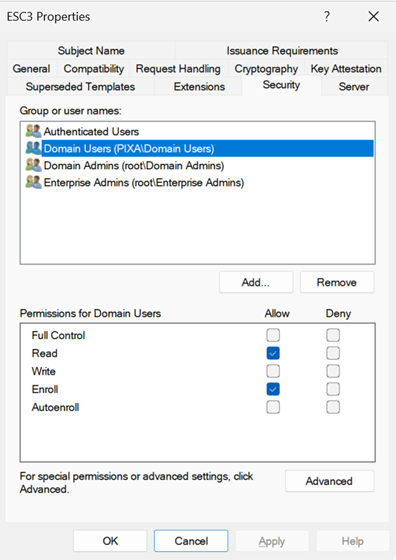
Half two; on-behalf-of enrollment and where the CA lets it land.
An agent certificate is only useful if the CA will accept an on-behalf-of request signed with it. Two things govern that.
The first is the CA's enrollment agent restrictions. On the CA itself, in the Enrollment Agents tab of the Certification Authority console, there is a setting that decides which agents may enroll on behalf of which principals, for which templates. The default is "Do not restrict enrollment agents." Most environments never change it. When it is unset, any holder of any agent certificate can request on behalf of anyone, for anything they could enroll in.
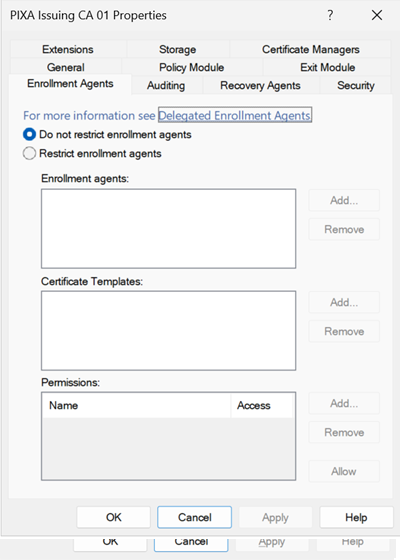
The second is the target template, and this is where the schema version of the template changes the rules.
Schema version 1 targets. The default User template is V1. So are several other defaults. V1 templates have no concept of required application policies, which means the CA will accept an enrollment agent signature on a request for a V1 template without the template having to declare that it expects one. If a low-privileged account can enroll in a V1 template that issues a domain authentication EKU (Client Authentication, Smart Card Logon, PKINIT Client Authentication, or Any Purpose), and that account holds an agent certificate, and the CA's enrollment agent restrictions are unset, the on-behalf-of request succeeds. The default User template satisfies all of this out of the box. This is the path in the cold open, and it is the most common ESC3 in the wild because nobody had to misconfigure anything; the defaults shipped this way.
Schema version 2 and above targets. V2+ templates have the required application policies mechanism (msPKI-RA-Application-Policies). For an enrollment agent to enroll on behalf of someone against a V2+ template, the template must require an authorized signature (msPKI-RA-Signature of at least 1) and name the Certificate Request Agent EKU as the required signing application policy. A V2 template that does not require an agent signature cannot be used as an on-behalf-of target at all. A V2 template that does require one is, by definition, set up to be enrolled on behalf of others. That is the legitimate smart card enrollment station pattern. It is also, if the agent certificate is obtainable by the wrong people, the second half of ESC3.
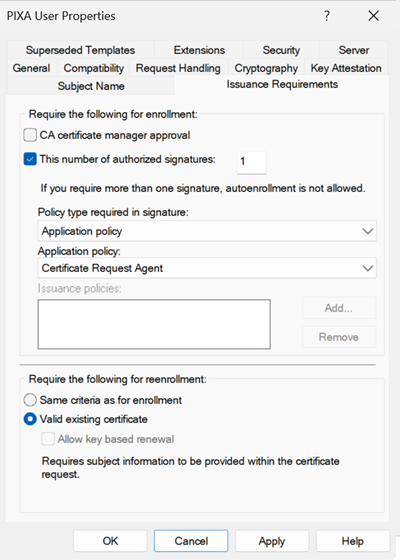
The part that bites you: the ESC1 and ESC2 fix is the ESC3 condition
This is the reason ESC3 deserves its own article rather than a footnote on ESC2.
In the ESC2 article, the strongest configuration-level mitigation for a sensitive template was the authorized signatures requirement. Setting msPKI-RA-Signature to one or more, with the Certificate Request Agent application policy, means a request has to be co-signed by an enrollment agent before the CA will issue. That kills ESC1 and ESC2 on that template, because the attacker holding only their own low-privileged credential has no agent certificate to sign with.
Read that again with ESC3 in mind. The mitigation for ESC1 and ESC2 is to require an enrollment agent signature. The enabling condition for ESC3 on a V2 template is that it requires an enrollment agent signature. They are the same configuration.
The requirement only protects you if the set of people who can obtain an enrollment agent certificate is smaller and more trusted than the set of people who could otherwise enroll in the target. If you harden a sensitive V2 template by requiring an agent signature, and somewhere else in the forest a template hands out agent certificates to Domain Users, you have not closed the path. You have changed which template the attacker enrolls in first.
So the three controls are a set, not alternatives. You control who can get an agent certificate. You control which agents the CA will honour, for whom, through enrollment agent restrictions. And you control which templates require an agent signature. Tightening any one while leaving the others open moves the finding rather than closing it. This is the single most common reason an environment that "fixed ESC1" still fails an ESC3 check.
How the attack works
Against a V1 target (the User template path).
Discovery is the same enumeration as ESC1 and ESC2: read the templates in the configuration partition, find the one carrying the Certificate Request Agent EKU, confirm a low-privileged account can enroll. Any authenticated user can do this.
Half one is an unremarkable enrollment. The account requests a certificate from the agent template using its own credential. The CA issues it because the account has Enroll and the template requires neither approval nor a signature. The account now holds an agent certificate.
Half two is the on-behalf-of request. The account submits a request for the User template, naming a Domain Admin as the subject, and signs the request with its agent certificate. The CA checks its enrollment agent restrictions, finds none, accepts the signature, and issues a client authentication certificate to the Domain Admin. The private key is held by the attacker.
The account then authenticates to a domain controller as the Domain Admin using that certificate, by way of PKINIT. From there it is a Kerberos ticket and the usual post-exploitation.
Against a V2 target.
Same two halves. The only difference is that the target template is one that explicitly requires an agent signature, which is to say a template someone configured for delegated enrollment. The agent certificate satisfies that requirement. Everything else proceeds identically.
Why strong certificate mapping does not save you here.
For ESC1 and ESC2 I could tell you that KB5014754 strong certificate mapping, in full enforcement mode, blunts the domain authentication payoff. The attacker supplied an arbitrary subject, the certificate's SID extension did not bind to a privileged account, and a patched domain controller in enforcement rejected the logon.
That argument does not transfer to ESC3, and it would be a mistake to assume it does.
In ESC3 the CA issues the certificate to the victim, through the legitimate on-behalf-of path. The CA builds the subject and the SID security extension (szOID_NTDS_CA_SECURITY_EXT, OID 1.3.6.1.4.1.311.25.2) from the victim's real Active Directory object. The resulting certificate carries the victim's correct SID. When the attacker authenticates with it, the domain controller checks the SID in the extension against the account, finds an exact match, and accepts the logon. Strong mapping is satisfied because the certificate is, as far as the CA and the KDC are concerned, a perfectly valid certificate for that user.
A fully patched 2026 environment, with StrongCertificateBindingEnforcement set to enforcement, does not stop ESC3. The control that mattered for ESC1 and ESC2 is not a control here. ESC3 has to be closed at enrollment, not at authentication.
Why each step works.
There is no bug. The Certificate Request Agent EKU exists so that an enrollment station can provision certificates for users who are not present, which is a real operational need for smart card and PIV-style deployments. The CA ships with enrollment agent restrictions disabled because Microsoft cannot know your delegation model. V1 templates accept agent signatures without declaring them because the V1 schema predates the mechanism that would let them. Every component is doing what it was built to do. The exposure is in publishing an agent-capable template where low-privileged users can enroll, and never configuring the CA to constrain what agents can do.
The prevention you should have had
As with ESC2, the cleanup story above is longer than the prevention story, and the prevention story makes most of the cleanup unnecessary if you apply it early. Three principles, and they correspond to the three controls from the section above.
Treat the Certificate Request Agent EKU as privileged.
A template that issues agent certificates is not an ordinary template. Holding an agent certificate is, in effect, delegated authority to request certificates as other people. It belongs in the same risk tier as membership in a sensitive group.
Agent-capable templates should be enrollable only by a named, small, reviewed set of accounts; the specific enrollment station operators who actually provision certificates. Not Authenticated Users, not Domain Users, not a stale group from a pilot. Manager approval on the agent template is appropriate given how rarely a new agent certificate should legitimately be issued. And remember that Any Purpose and No-EKU templates are agent-capable too, so the ESC2 cleanup and the ESC3 cleanup are the same work approached from two directions.
Configure the CA's enrollment agent restrictions.
This is the control most environments have never touched, and it is the one that contains the blast radius. In the Enrollment Agents tab of each CA, restrict agents explicitly: which agent accounts may enroll on behalf of which principals, for which templates. The legitimate enrollment station operators should be limited to the templates they actually provision and, where the console supports it, to the populations they serve.
The default of "Do not restrict enrollment agents" should be considered a finding on its own in any environment that has agent-capable templates published. Even if you cannot immediately enumerate every legitimate agent, scoping the restriction to known operators and known templates closes the path for everyone else.
Keep the publish-only-what-you-use discipline.
The same principle from the ESC2 article applies. An agent-capable template that is not published cannot be enrolled in. A target template that is not published cannot be the second half of the chain. The smart card pilot template from the cold open should have been unpublished the day the pilot ended. Every published template should map to a documented operational need in the CP and CPS, and agent-capable templates should be on the shortest list you maintain.
Why this is everywhere
ESC3 turns up less often than ESC1, but when it does the path to domain admin is shorter and quieter, and the cause is almost always one of these.
The smart card or PIV pilot that ended on paper but not in the directory. A project provisions a delegated enrollment template so an enrollment station can issue cards. The project wraps up, the station is decommissioned, the template stays published, and the enrollment group keeps resolving to accounts that have moved on. The capability outlives the reason for it.
The MFA or passwordless rollout. Certificate-based authentication projects routinely create enrollment agent templates so that an onboarding flow can issue credentials on behalf of users. The template is correct for the project. The Enroll permission is too broad because the project was in a hurry, and the CA's enrollment agent restrictions were never configured because the project did not know they existed.
The ESC1 or ESC2 remediation that required an agent signature. A team hardens a sensitive template by requiring an authorized signature with the Certificate Request Agent policy, ticks the box marked "fixed," and never checks whether an agent certificate is obtainable elsewhere. The remediation is sound in isolation and incomplete in context. This is the one that catches experienced teams.
Any Purpose templates that were never recognised as agent-capable. An ESC2 Variant A template issues Any Purpose certificates. Any Purpose includes the agent capability. If that template stayed enrollable after an incomplete ESC2 cleanup, it is also an ESC3 source. The finding wears two labels.
Why nobody catches it: the Certificate Request Agent EKU looks like one more entry in the Extensions tab, indistinguishable at a glance from Client Authentication or Server Authentication. The CA's enrollment agent restrictions are on a tab almost nobody opens. And the on-behalf-of mechanism is a legitimate, documented Windows feature, so it does not trip the instinct that says "this should not be possible."
Detecting ESC3 in your environment
ESC3 detection is a three-part question, and you need all three parts to know whether you have an exploitable path.
1. Which templates can mint enrollment agent certificates, and who can enroll in them?
2. Which templates can be enrolled on behalf of others (V1 with a domain auth EKU, or V2+ requiring an agent signature)?
3. Does the CA restrict enrollment agents?
A finding requires part one (someone can get an agent certificate) and part two (there is a useful target) and part three being unset or permissive. Any one of the three, closed, breaks the chain.
certutil for a known template.
certutil -dstemplate ESC3The fields that matter on a candidate agent template:
pKIExtendedKeyUsage: look for OID1.3.6.1.4.1.311.20.2.1(Certificate Request Agent), or2.5.29.37.0(Any Purpose), or an empty list on a V1 template. Any of these is agent-capable.msPKI-Enrollment-Flag: absence ofCT_FLAG_PEND_ALL_REQUESTS(0x2) means no manager approval.msPKI-RA-Signature: 0 means the agent certificate itself can be obtained without a signature.nTSecurityDescriptor: the ACL. Same Enroll analysis as ESC1.
For a candidate V2 target template, the tells are msPKI-RA-Signature of 1 or more and msPKI-RA-Application-Policies containing the agent EKU.
PowerShell enumeration across the forest.
This surfaces both halves of the chain: agent-capable source templates and on-behalf-of-capable target templates. The Enroll permission check is Expand-EnrollPrincipals from the ESC1 article, run against each candidate.
# Enumerate the two halves of ESC3 in the current forest.
# Half 1: templates that can mint enrollment agent certificates.
# Half 2: templates that can be enrolled on behalf of others.
# Server 2022 native. Read-only. Requires the ActiveDirectory module (RSAT).

Set-StrictMode -Version Latest
$ErrorActionPreference = 'Stop'
Import-Module ActiveDirectory

$configNC      = (Get-ADRootDSE).configurationNamingContext
$templatesPath = "CN=Certificate Templates,CN=Public Key Services,CN=Services,$configNC"

$agentEKU      = '1.3.6.1.4.1.311.20.2.1'   # Certificate Request Agent
$anyPurposeEKU = '2.5.29.37.0'              # Any Purpose (superset, includes agent)
$authEKUs      = @(
    '1.3.6.1.5.5.7.3.2',                    # Client Authentication
    '1.3.6.1.4.1.311.20.2.2',               # Smart Card Logon
    '1.3.6.1.5.2.3.4',                      # PKINIT Client Authentication
    $anyPurposeEKU                          # Any Purpose
)

$templates = Get-ADObject -SearchBase $templatesPath `
    -LDAPFilter '(objectClass=pKICertificateTemplate)' `
    -Properties name, displayName, 'msPKI-Enrollment-Flag',
                'msPKI-RA-Signature', 'msPKI-RA-Application-Policies',
                'msPKI-Template-Schema-Version', pKIExtendedKeyUsage

$agents  = New-Object System.Collections.Generic.List[object]
$targets = New-Object System.Collections.Generic.List[object]

foreach ($t in $templates) {
    $enrollFlag = if ($t.'msPKI-Enrollment-Flag') { [int]$t.'msPKI-Enrollment-Flag' } else { 0 }
    $raSigs     = if ($t.'msPKI-RA-Signature')    { [int]$t.'msPKI-RA-Signature' }    else { 0 }
    $schema     = if ($t.'msPKI-Template-Schema-Version') { [int]$t.'msPKI-Template-Schema-Version' } else { 1 }
    $ekus       = @($t.pKIExtendedKeyUsage)
    $raPolicies = @($t.'msPKI-RA-Application-Policies')

    $requiresApproval = ($enrollFlag -band 0x2) -ne 0   # CT_FLAG_PEND_ALL_REQUESTS

    # Half 1: agent-capable source. Obtainable without a gate.
    $agentCapable = ($ekus -contains $agentEKU) -or
                    ($ekus -contains $anyPurposeEKU) -or
                    ($schema -le 1 -and $ekus.Count -eq 0)
    if ($agentCapable -and -not $requiresApproval -and $raSigs -eq 0) {
        $agents.Add([PSCustomObject]@{
            Name       = $t.name
            DisplayName= $t.displayName
            Schema     = $schema
            Reason     = if ($ekus -contains $agentEKU) { 'Certificate Request Agent EKU' }
                         elseif ($ekus -contains $anyPurposeEKU) { 'Any Purpose (superset)' }
                         else { 'No EKU (V1, SubCA-capable)' }
        })
    }

    # Half 2: on-behalf-of-capable target with a domain auth EKU.
    $hasAuthEKU = ($ekus | Where-Object { $authEKUs -contains $_ }).Count -gt 0
    if ($hasAuthEKU) {
        $obhCapable = $false
        $how = $null
        if ($schema -le 1) {
            # V1 accepts an agent signature without declaring it.
            $obhCapable = $true; $how = 'V1: accepts agent signature implicitly'
        } elseif ($raSigs -ge 1 -and ($raPolicies -contains $agentEKU)) {
            # V2+ explicitly configured for agent-signed enrollment.
            $obhCapable = $true; $how = 'V2+: requires Certificate Request Agent signature'
        }
        if ($obhCapable) {
            $targets.Add([PSCustomObject]@{
                Name       = $t.name
                DisplayName= $t.displayName
                Schema     = $schema
                How        = $how
            })
        }
    }
}

Write-Host "ESC3 half 1 -- agent-capable templates obtainable without a gate:" -ForegroundColor Yellow
if ($agents.Count) { $agents | Format-Table -AutoSize }
else { Write-Host "  none" -ForegroundColor Green }

Write-Host ""
Write-Host "ESC3 half 2 -- on-behalf-of-capable target templates:" -ForegroundColor Yellow
if ($targets.Count) { $targets | Format-Table -AutoSize }
else { Write-Host "  none" -ForegroundColor Green }

Write-Host ""
Write-Host "For every template above, run Expand-EnrollPrincipals (ESC1 article) to confirm"
Write-Host "who can actually enroll. A path exists when a low-privileged principal can enroll"
Write-Host "in a half-1 template AND in a half-2 template AND the CA does not restrict agents."
The script reports candidates. It does not by itself prove a path, because the binding question is whether the same low-privileged population can reach a half-1 template and a half-2 template. Run Expand-EnrollPrincipals against both lists and intersect the results.
Check the CA's enrollment agent restrictions.
The template analysis above lives in Active Directory. The third part of the question lives on each CA and has to be read there.
certutil -getreg CA\EnrollmentAgentRightsIf the value is absent or empty, the CA is not restricting enrollment agents, which is the default and the permissive case. A populated value means restrictions are configured, and you then have to read them to judge whether they actually constrain the agents and templates that matter. The Enrollment Agents tab in the Certification Authority console shows the same configuration in a readable form.
An environment with agent-capable templates published and no enrollment agent restrictions on the issuing CA has the path open regardless of how the individual templates are scoped.
Remediating ESC3
You break the chain by closing any one of the three parts. Close more than one and you have defence in depth. The order below is fastest-and-most-contained first.
Restrict enrollment agents on the CA.
This is the highest-leverage single change because it applies to every agent certificate and every target at once. Configure the Enrollment Agents tab on each CA to permit only the specific operator accounts that legitimately provision certificates, scoped to the specific templates they provision. Everyone else's agent certificate, including any an attacker obtains, becomes useless for on-behalf-of enrollment.
If you have no legitimate enrollment agents at all, which is common once a pilot has ended, the correct restriction is one that permits nobody, or simpler still, deal with the source templates below so there are no agent certificates to honour.
Two limitations of this control are worth knowing before you rely on a clean-looking screenshot of it.
The three lists are independent sets, not bound rows. The Enrollment Agents tab presents three boxes: the agents, the templates, and the principals the agents may act on behalf of. The dialog evaluates them independently. A request passes if the agent is in the first set and the template is in the second and the target is in the third. There is no per-agent mapping in the dialog. The moment you list two agents and two templates, you have authorized the full cross-product: agent one against template two, agent two against template one, every combination. The dialog shows three boxes and silently means any-to-any across them. If you have more than one agent identity or more than one delegated template and the cross-product is unacceptable, the clean answer is to separate the delegations onto different issuing CAs, so each CA's restriction set contains exactly one meaningful combination. The underlying storage format does support a per-agent binding (each access control entry binds one agent to its template and target list); it is only the GUI that flattens it. Reaching that per-agent binding means writing the descriptor yourself, below.
The object picker will not select a gMSA. The Enrollment Agents picker is the older users-and-groups picker and will not resolve a group managed service account, even though the restriction itself is stored by SID and is perfectly capable of holding a gMSA's SID. So an environment whose enrollment agent is a gMSA, which is the right design for an NDES or FAS service identity, cannot express that restriction through the GUI at all. The descriptor has to be written with the SID directly.
Writing the descriptor directly when the GUI cannot. The restriction lives in the CA's EnrollmentAgentRights value, stored as a self-relative security descriptor whose access control entries use callback ACE types that carry the template and target list as application data. Hand-marshaling that from the specification is error-prone, and the encoding of the template identifier is the easy part to get subtly wrong. The lower-risk approach is reference-and-patch: configure the restriction in the GUI using a placeholder traditional service account as the agent, with the single template and single target group you actually want, so the GUI produces one correctly-bound entry; read the bytes back; replace the placeholder account's SID with the gMSA's SID inside the blob; write it back; restart the policy module.
$ca    = "ISSUING-CA-HOST\Your-Issuing-CA-Name"
$admin = New-Object -ComObject CertificateAuthority.Admin

# 1. Read the known-good descriptor the GUI produced for the placeholder account.
$bytes = $admin.GetConfigEntry($ca, "", "EnrollmentAgentRights")

# 2. Resolve both SIDs.
$gmsaSid        = (Get-ADServiceAccount ndes-gmsa).SID.Value
$placeholderSid = (Get-ADUser svc-ndes-placeholder).SID.Value

# 3. Replace the placeholder SID with the gMSA SID inside the blob, write it back.
#    (Both are SIDs of the same binary shape, so this is a substitution, not a re-marshal.)
$admin.SetConfigEntry($ca, "", $patchedBytes, "EnrollmentAgentRights")
Restart-Service certsvc
The failure mode here is fail-closed: if the substitution is wrong, the agent match fails, the on-behalf-of request is denied, and enrollment breaks visibly on the next request rather than silently permitting. Do it in a lab first and test one real enrollment end to end before production. Confirm the result with certutil -getreg CA\EnrollmentAgentRights.
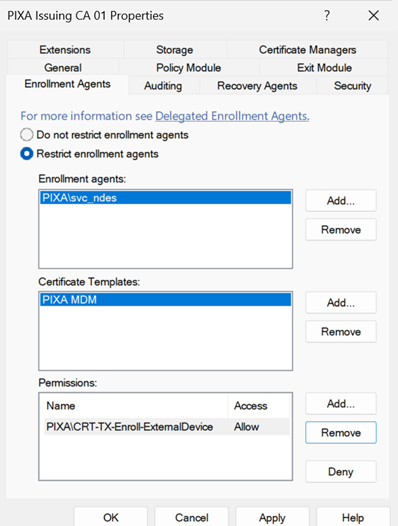
A correctly restricted CA is the configuration Figure 5 shows.
Close the source: scope or unpublish agent-capable templates.
For any template that issues Certificate Request Agent certificates, restrict Enroll to the named operator accounts and add manager approval. If the template exists only because of a project that has ended, unpublish it. If it is a default that is published without a current need, unpublish it and work toward deletion, the same way the ESC2 article describes for the SubCA template.
Do not forget the Any Purpose and No-EKU templates here. If your ESC2 cleanup left any of them enrollable, they are still agent sources. The clean answer for those is the ESC2 answer: remove Any Purpose in favour of the specific EKUs the consumers need, and unpublish No-EKU templates rather than retrofitting them.
Reconsider the target side.
For V2 templates that require an agent signature: confirm the requirement is matched by restricted enrollment agents on the CA. The signature requirement is a real control, but only when the set of valid signers is controlled. A required-signature template with unrestricted agents is the worst of both, it looks hardened and is not.
For V1 targets like the default User template: the long-term answer is to stop relying on V1 defaults. Replace the User template's role with a properly scoped V2 template and unpublish the V1 default. While the V1 User template is published and enrollable by Domain Users, it is an available ESC3 target for any agent certificate the CA will honour, which is why the enrollment agent restriction matters so much in the interim.
What the lab ended up with.
For the BrkrOps lab:
- ESC3: Enroll scoped to the NDES server hosts; manager approval enabled; private-key access restricted to the gMSA on those hosts. It is published only while device enrollment is in service.
- The issuing CA: enrollment agent restrictions configured to permit only the NDES gMSA, only for the MDM template, only on behalf of the managed-device population, written by SID because the picker cannot select the gMSA.
- The default User template: unpublished, its role replaced by a scoped V2 client authentication template.
- PIXA User (V2, required agent signature): retained as the legitimate delegated-enrollment template, now covered by the CA restriction so only the intended agent can sign for it.
The KB5014754 enforcement state did not change anything for ESC3, by design. The fixes are all at enrollment.
A real configuration: NDES, Citrix FAS, and where the residual sits
The cleanest way to see why all three controls matter is a configuration that is legitimate, common, and still leaves a residual if you stop at the obvious controls. Network Device Enrollment Service is the canonical example.
NDES needs the Certificate Request Agent capability to function. The NDES server requests an enrollment agent certificate, the service identity (a gMSA, in a well-built deployment) holds the private key, and NDES uses it to enroll on behalf of devices for an MDM or SCEP device template. This is not a misconfiguration. It is what NDES is. Citrix FAS is the same shape with a different consumer: FAS holds an agent certificate and enrolls on behalf of users so they can authenticate to published resources. Both are supposed to be enrollment agents.
So walk the three controls against this.
The agent source can be closed well. The Certificate Request Agent template that NDES enrolls in should be scoped so only the NDES servers can enroll, with a separate template for FAS scoped to the FAS server, and private-key access restricted to the gMSA on those hosts. Done properly, an ordinary user cannot obtain an agent certificate through these templates. This is the part most environments that have thought about it at all get right, and it closes half one for everyone outside the service hosts.
What that scoping does not close is the CA. If the issuing CA still carries the default "do not restrict enrollment agents," then both legitimate agent certificates, NDES's and FAS's, can enroll on behalf of anyone, for any template their holder can enroll in. That is no longer an ordinary-user problem. It is a blast-radius problem: compromise of the NDES server, which is internet-facing by design as the SCEP endpoint, lets that identity request a User certificate on behalf of a Domain Admin against the default User template. The MDM template being tightly scoped to the gMSA does nothing here, because the attack does not go through the MDM template. It goes through the User template, which the agent can also enroll in, on an unrestricted CA.
The honest conclusion is that scoping the agent template reduces ESC3 from "any Domain User reaches domain admin" to "NDES server compromise reaches domain admin." That is a large and worthwhile reduction. It is not elimination, and the gap between the two is the CA's enrollment agent restriction.
Closing that last gap is where the GUI limitations bite. The restriction you want is "the NDES gMSA may act as an agent only for the MDM template, only on behalf of managed devices." The GUI cannot express it, on two counts. It cannot select the gMSA, and if NDES and FAS share an issuing CA, its independent-set evaluation authorizes the cross-product of both agents against both templates. The way out is one or both of: separate the NDES and FAS delegations onto different issuing CAs so each CA's restriction has a single meaningful combination, and write the gMSA-scoped restriction directly into the CA's EnrollmentAgentRights descriptor by SID using the reference-and-patch method above. Only then does NDES server compromise mint device certificates and stop, rather than escalating to a domain admin certificate.
One caveat specific to MDM targets. The Permissions list, the on-behalf-of population, only constrains targets that are Active Directory principals. Intune-managed mobile devices are not AD computer objects, so for those the target restriction does no work and the template scope is the control carrying the load. That is fine for the device case; it is worth knowing so you do not over-trust the Permissions column for a population it cannot see.
The reality at scale
The ESC1 article covers the multi-forest, hundreds-of-templates, continuous-program reality, and it holds here. ESC3 adds one wrinkle that the others do not: the finding is a relationship between two templates and a CA setting, not a property of a single object. You cannot decide whether you have an ESC3 path by looking at one template in isolation. You have to enumerate the agent sources, enumerate the targets, expand both against your group structure, and check each CA's restrictions, and then ask whether the same people can reach both ends.
That is more state to carry than a single-template check, and it is exactly the kind of cross-object analysis that does not survive being done by hand across five forests on a quarterly cadence. The publish-only-what-you-use discipline shrinks the problem the same way it does for ESC2: fewer published templates means fewer possible source-target pairs to evaluate.
How Truvald handles this
Truvald enumerates every certificate template across every CA in every forest it has access to, identifies the agent-capable source templates and the on-behalf-of-capable targets, expands Enroll permissions across nested groups and forest trusts, reads each CA's enrollment agent restrictions, and reports the actual exploitable pairs rather than a list of candidates you have to correlate yourself. It runs the same analysis for ESC1, ESC2, and ESC4 through ESC16, alongside the broader set of CA configuration, PKI object ACL, and GPO checks.
For ESC3 specifically, Truvald reports the chain, not the pieces. A finding names the source template, the target template, the low-privileged population that can reach both, and the CA whose unrestricted agents make it work, with the remediation that closes the shortest part of the chain. It also flags the case the section above warns about: a template hardened for ESC1 or ESC2 with a required agent signature, where an agent certificate is obtainable elsewhere in the forest.
Output is a written assessment report. Word format. Every finding, severity, specific template, specific misconfiguration, recommended remediation, residual risk. Suitable for the technical team and for the exec summary the technical team has to write.
Truvald runs inside the customer's network. No cloud, no telemetry, no data leaves. The template configurations, CA settings, and enrollment agent restrictions being assessed are among the most sensitive material in an enterprise environment. Truvald is built so BrkrOps never sees any of it.
Free 30-day evaluation at truvald.ca. For organizations that want the work delivered as an engagement, with BrkrOps running it in your environment, producing the report, and walking your team through the remediation roadmap, the Truvald + Assessment package combines the license with three days of consulting.
References
- Will Schroeder and Lee Christensen. Certified Pre-Owned: Abusing Active Directory Certificate Services. SpecterOps, June 2021.
- GhostPack Certify wiki, escalation techniques, ESC3.
- Microsoft [MS-CRTD]: Certificate Templates Structure.
- Microsoft [MS-WCCE]: Windows Client Certificate Enrollment Protocol (on-behalf-of enrollment and the Certificate Request Agent).
- Microsoft KB5014754: Certificate-based authentication changes on Windows domain controllers.
- The ESC1 defender's guide (companion article). Detection tooling, nested-group expansion, scaling.
- The ESC2 defender's guide (companion article). Publish-only-what-you-use, the authorized-signatures requirement.
Next in this series: ESC4, when the attacker does not need a misconfigured template because they can rewrite a good one. Dangerous ACLs on the template object itself, how WriteProperty and WriteDacl turn any template into an ESC1, and why template permissions are the control that quietly underwrites all the others.
Patrick Mercier writes Truvald™ for BrkrOps™ Inc. out of Edmonton, Alberta. Truvald™ runs entirely inside your environment, no telemetry, no cloud component. A free Evaluation is available at truvald.ca/download.
Questions, corrections, or want to talk PKI? admin@brkrops.ca